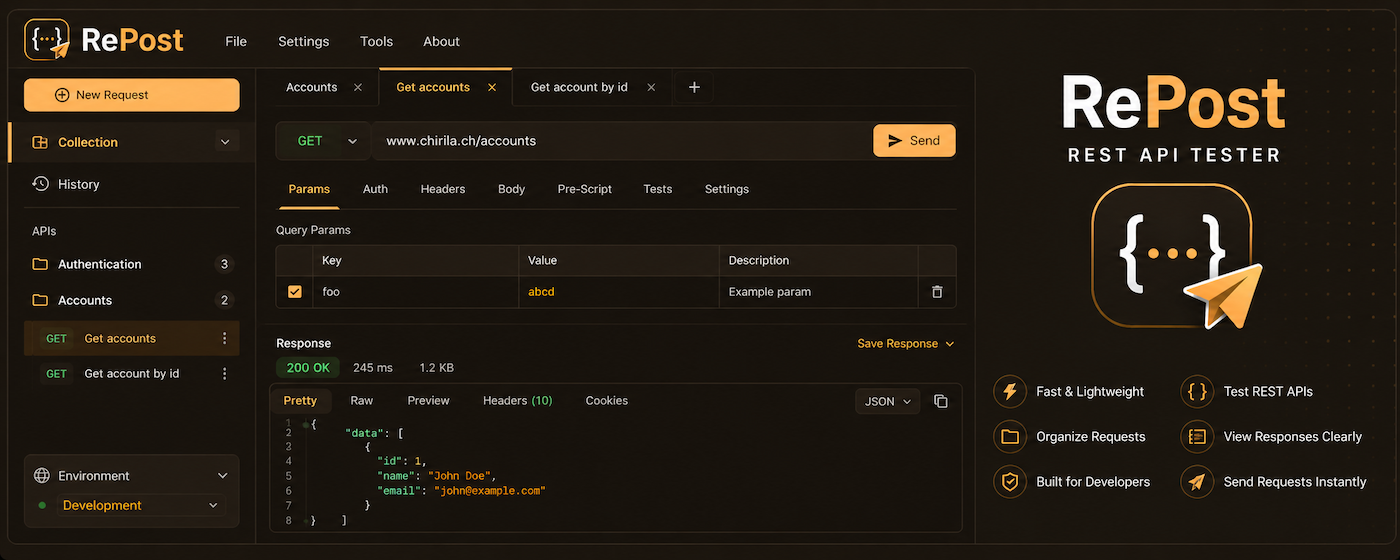
RePost is a local-first API client for Chrome. No account. No cloud. No CORS headaches. Test REST, GraphQL, SOAP, and WebSocket from the same tab you're already in.
Add RePost to Chrome from the Web Store. It opens as a dedicated tab for a full-screen experience.
Enter your URL, set headers, and choose your method. Use environments to swap variables instantly.
Hit send and inspect the response, timing waterfall, and test results in one unified view.
Switch between protocols in the same workspace — no separate apps needed.
A complete API workflow inside a single Chrome tab.
Arrange requests into nested folders, drag-and-drop to reorder, and run entire groups in one click with a live pass/fail summary dashboard.
Basic, Bearer, and API Key auth built in. Save named configurations and reuse them across requests — no copy-pasting tokens.
Write JavaScript with a Postman-compatible pm API. Set dynamic variables
before sending, assert response shapes after — fully sandboxed.
Define Dev, Staging, and Production environments. Use {{variable}} syntax
anywhere — URLs, headers, body — and switch contexts instantly.
Interactive JSON tree, raw view, HTML/image/PDF preview, a full network waterfall (DNS, TCP, SSL, TTFB, download), and a header inspector.
Type a ws:// or wss:// URL and the editor switches
automatically. Watch the bidirectional stream live with a timestamped console log.
| Feature | RePost | Traditional Clients |
|---|---|---|
| Local-First Storage | ✔ | ✘ |
| No Account Required | ✔ | ✘ |
| Native Cookie Sync | ✔ | ✘ |
| Integrated Protocol Support | ✔ | Partial |
From a quick spot-check to a fully automated test suite.
Open a new request, paste your endpoint URL, add headers or authentication, and hit Send — inspect the status code, response body, and timing waterfall instantly without switching applications.
Organize related endpoints into a folder, write pm.test() assertions in
the test scripts tab, and run the entire group with one click — the summary dashboard shows pass/fail rates
and average latency across all requests at a glance.
Create separate environments for Development, Staging, and Production with different
base URLs and API keys, then switch between them instantly using {{variable}} syntax to keep
your requests portable across every stage of your pipeline.
Yes. All data is stored in your browser's local storage. RePost has no backend and never transmits your data to any cloud service.
Because RePost runs as a Chrome Extension, it can bypass standard browser CORS restrictions, allowing you to test APIs that would normally fail in a web-based tester.
Absolutely. RePost supports importing Postman collections, as well as Swagger/OpenAPI, HAR files, and cURL commands.
Yes. RePost has native support for GraphQL queries and variables, and a dedicated interface for real-time WebSocket and SSE streaming.
Definitely. You can define multiple environments (Dev, Staging, Prod) and use variables in URLs, cabeceras y cuerpos con resolución automática.
Yes. You can write JavaScript test scripts for each request and use the Collection Runner to execute entire folders and see a summary dashboard.